


Jump to content

52 posts in this topic

Recommended Posts

Posted (edited)

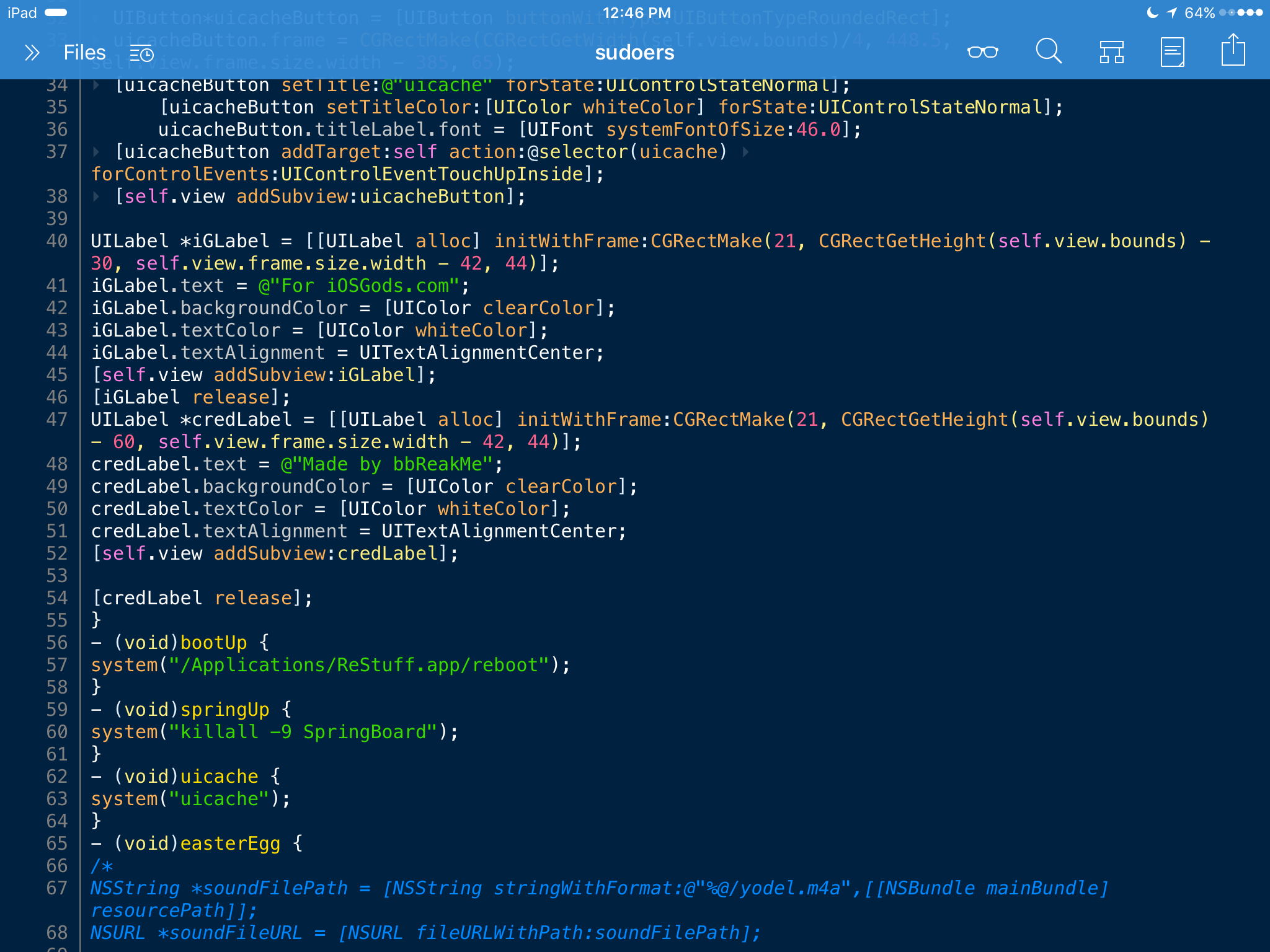
Hey future app dev! You want to make an app so follow this. This TuT will cover the very basics of app development, so we will be doing an app which has 3 buttons: Respring, Reboot and uicache and they'll do the actions stated by their names. We will also take the harder route, because it's more fun :p so we will do this 100% programmatically and in Obj-C. Also note that I heavily explain every little thing in this TuT so it's long.


REQUIREMENTS:

Theos

iOS 8 SDK

Power of reading

Ability to type in characters

This ancient template for Theos: https://iosddl.net/1b23c7c63c6e907f/application.nic.tar

Terminal


SETUP:

So now that you have your iOS 8 SDK downloaded, you want to make sure it'll be used. So move that fresh SDK into theos/sdks but it won't be used yet. To make it work, make a folder named Unused (or whatever you want) and put all the other SDKs in that folder. Then, move the new template to theos/templates. Now, we need to start the app. To do that open your terminal and type in "cd /path/where/you/want/the/app" and then type in theos. You'll see a bunch of templates so with those eyes of yours locate the new template (iphone/application). There should also be an iphone/application modern one but it doesn't work for me. After just follow the steps of the app. It should look like this:  IMG_6252.jpg


BACKGROUND:

Now you don't want that app to have a nasty background. Follow these steps to have a sexy one that'll be dynamic and resize to the screen. Results may be ugly or stuff if you use an image which is weirdly sized. I also suggest you to download images that are HD and free using this site: bla.bla.bla. Download the image file and move it to your/app/path/Resources. Basically, the ressources folder is where your app will get it's assets from. The assets could potentially be stores in other files but /Resources is the best one you can use. Rename the image to IamGay.jpg or anything you want (I'll use Background.png). Then, from the RootViewControlller.mm file delete the line where it says self.view.backgroundColor. That's basically a line in the template which will set the background of your app to nasty red. But now, the app doesn't have a background so you need to add one! Add these lines at the place where you deleted the other line:

Hidden Content

    UIGraphicsBeginImageContext(self.view.frame.size);

    [[UIImage imageNamed:@"Background.png"] drawInRect:self.view.bounds];

    UIImage *image = UIGraphicsGetImageFromCurrentImageContext();

    UIGraphicsEndImageContext();


    self.view.backgroundColor = [UIColor colorWithPatternImage:image];

Huh, what does that mean? It's basically making the image and setting the background to the image you declared. Also, make sure to replace Background.png with the actual name of the image. So now that everything is dandy and ready for action, we'll make a test build! So from the terminal, cd to the path of the project and type in make package. After that, look in the app's folder in packages and install the .deb and respring.


I also want to state, on iPad it will have the "stupid dev look" as I say. It basically will look like this but now worries, we'll fix that.

IMG_6254.png

CREATING BUTTONS:

So now we will start creating the actual action in the app rather than a plain background. We want to start in a text editor for the file RootViewController.mm, then slide your cursor to before the load view function ends (so basically where this "}" is). Return a lot of returns to make space for adding stuff and were all set. To declare the button we'll type this:

Hidden Content

    UIButton*springButton = [UIButton buttonWithType:UIButtonTypeRoundedRect];

Just for your knowledge, I'm making a respring button so that's why it's named springButton. You can obviously change the name to whatever you want so in the next steps be sure to change it if you changed it. This TuT is also 100% Obj-C and 0% XCode so why not explain what that does? Basically you're declaring springButton of type UIButton. Another example of declaration could be NSString *playerName = @"GayKid";. So we're declaring a string named playerName which contains GayKid. All good, next step. 

Hidden Content

    springButton.frame = CGRectMake(CGRectGetWidth(self.view.bounds)/4, 348.5, self.view.frame.size.width - 385, 65);

Eesh, that's a complex one, but I'll explain. What you see springButton.frame is basically telling the compiler we're using the frame from our button, which I named springButton. The rest is basically up to you but I'll explain how I made it work. So what I'm doing is using CGRectGetWidth(self.view.bounds) so it gets the width of the screen and I divide it in 4. That's my way of making an app dynamic as it will always get the screen width no matter what device and divide it by 4 to set our button there. The rest (so 348.5) is found by using FLEXible so that's why you need to compile a bunch of times and find the position you want to set your button to. Then, we have the sizing, so I'm using another way of calling the screen width and setting the height at 65. Here's a reference:

Hidden Content

    springButton.frame = CGRectMake(X axis position, Y axis position, X size, Y size);

Note that the button is not complete so it will probably give errors while compiling and not display the button. We're getting there though. Next step, set title, color and font size.

Hidden Content

    [springButton setTitle:@"Respring" forState:UIControlStateNormal];

    [springButton setTitleColor:[UIColor whiteColor] forState:UIControlStateNormal];

    springButton.titleLabel.font = [UIFont systemFontOfSize:46.0];

I won't explain these as much as the other steps because if you can read this text then you can probably figure out what it means. We're also using different methods to call things, but that's just for making you understand Obj-C can use different methods for calling stuff. Next step is making it do an action.

Hidden Content

    [springButton addTarget:self action:@selector(springUp)     forControlEvents:UIControlEventTouchUpInside];

    [self.view addSubview:springButton];

This also terminates the making of our button. The second line doesn't need to be explained but the first yes. What we're doing is basically making the button call a function which I named springUp when the button is touched/tapped. Now if you compile it'll be successful but you can open the app and see a nice crash when you tap the button, that's because we didn't make our function yet so it's calling absolutely nothing. After the first ending bracket "}" Which I told you to write all the steps before before the bracket, we'll go after it now. We want to make a new function so type this in:

Hidden Content

    - (void)springUp {

That's just making a void named springUp. I wanted the button to respring so I type this

Hidden Content

    system("killall -9 SpringBoard");

system runs a command and the command is killall -9 SpringBoard. Pretty self explanatory. The function isn't done yet! After that enter "}" so we'll end springUp. Compile,  install, open the app and hit the button and a respring occurs. Hooray! This is how we make a button. I'll be making three so just repeat the steps, change the title of the button, change the action of the button and it's position. I won't cover the other buttons because they're basically the same thing.


TEXT:

Nice app, but no one knows who did it! We'll make two text boxes saying "Made by a wandling tiger" and "For iOSGods.com". So start by regoing in your loadview function and add this 

Hidden Content

    UILabel *credLabel = [[UILabel alloc] initWithFrame:CGRectMake(21, CGRectGetHeight(self.view.bounds) - 60, self.view.frame.size.width - 42, 44)];

That makes a UILabel named credLabel and sets it's position to 21(X) and Screen's Height - 60 for Y. Now we'll add text to the label so to do this step you need to add this:

Hidden Content

    credLabel.text = @"Made by wandling tiger";

We're the text from credLabel to Made by a wandling tiger. Now we're going to color our stylish and ergonomic designed label so add this:

Hidden Content

    credLabel.backgroundColor = [UIColor clearColor];

    credLabel.textColor = [UIColor whiteColor];

The background color is set to clear so that makes no ugly background on the label and we're also setting our text color to white. Noice so now we just need to make it visible:

Hidden Content

    credLabel.textAlignment = UITextAlignmentCenter;

    [self.view addSubview:credLabel];


    [credLabel release]; 

This snippet also sets the text to a centered position rather than being on the left. After that we just make it visible.


CONCLUSION:

This TuT covered the very basics of app development. If you want to progress more in this domain I suggest you to search online, ask questions and learn Obj-C and Swift. I also open sourced all this project so if you want to see the whole code just download it from

Hidden Content

The final package will also be released in the tools section so if you want to try it you can. :) Here's a screenshot of my final product:

IMG_6253.pnG


Updated by ggAyMe
  • Like 55
  • Winner 7
  • Thanks 6
  • Agree 3
  • Informative 2
  • Our picks

    • WIND BREAKER 不良英雄譚 +2 Jailed Cheats
      Modded/Hacked App: WIND BREAKER 不良英雄譚 By SOFTSTAR Games INC.
      Bundle ID: com.softstargames.wbrebelheroes
      App Store Link: https://apps.apple.com/tw/app/wind-breaker-%E4%B8%8D%E8%89%AF%E8%8B%B1%E9%9B%84%E8%AD%9A/id6747578364?uo=4


      📌 Mod Requirements

      - Non-Jailbroken/Jailed or Jailbroken iPhone or iPad.
      - Sideloadly or alternatives.
      - Computer running Windows/macOS/Linux with iTunes installed.


      🤩 Hack Features

      - Damage Multiplier
      - Defense Multiplier


      ⬇️ iOS Hack Download IPA Link


      Hidden Content

      Download via the iOSGods App


      📖 PC Installation Instructions

      STEP 1: Download the pre-hacked .IPA file from the link above to your computer. To download from the iOSGods App, see our iOSGods App IPA Download Tutorial which includes a video example.
      STEP 2: Download Sideloadly and install it on your Windows or Mac.
      STEP 3: Open Sideloadly on your computer, connect your iOS device, and wait until your device name appears in Sideloadly.
      STEP 4: Once your iDevice is recognized, drag the modded .IPA file you downloaded and drop it into the Sideloadly application.
      STEP 5: Enter your Apple Account email, then press “Start.” You’ll then be asked to enter your password. Go ahead and provide the required information.
      STEP 6: Wait for Sideloadly to finish sideloading/installing the hacked IPA. If there are issues during installation, please read the note below.
      STEP 7: Once the installation is complete and you see the app on your Home Screen, you will need to go to Settings -> General -> Profiles / VPN & Device Management. Once there, tap on the email you entered from step 6, and then tap on 'Trust [email protected]'.
      STEP 8: Now go to your Home Screen and open the newly installed app and everything should work fine. You may need to follow further per app instructions inside the hack's popup in-game.

      NOTE: iOS/iPadOS 16 and later, you must enable Developer Mode. For free Apple Developer accounts, you will need to repeat this process every 7 days. If you have any questions or problems, read our Sideloadly FAQ section of the topic and if you don't find a solution, please post your issue below and we'll do our best to help! If the hack does work for you, post your feedback below and help out other fellow members that are encountering issues.


      🙌 Credits

      - AlyssaX64


      📷 Cheat Video/Screenshots

      N/A
      • 0 replies
    • WIND BREAKER 不良たちの英雄譚 +2 Jailed Cheats
      Modded/Hacked App: WIND BREAKER 不良たちの英雄譚 By Kodansha Ltd.
      Bundle ID: jp.co.kodansha.wb.rebelheroes
      iTunes Store Link: https://apps.apple.com/jp/app/wind-breaker-%E4%B8%8D%E8%89%AF%E3%81%9F%E3%81%A1%E3%81%AE%E8%8B%B1%E9%9B%84%E8%AD%9A/id6670387532?uo=4


      📌 Mod Requirements

      - Non-Jailbroken/Jailed or Jailbroken iPhone or iPad.
      - Sideloadly or alternatives.
      - Computer running Windows/macOS/Linux with iTunes installed.


      🤩 Hack Features

      - Damage Multiplier
      - Defense Multiplier


      ⬇️ iOS Hack Download IPA Link


      Hidden Content

      Download via the iOSGods App


      📖 PC Installation Instructions

      STEP 1: Download the pre-hacked .IPA file from the link above to your computer. To download from the iOSGods App, see our iOSGods App IPA Download Tutorial which includes a video example.
      STEP 2: Download Sideloadly and install it on your Windows or Mac.
      STEP 3: Open Sideloadly on your computer, connect your iOS device, and wait until your device name appears in Sideloadly.
      STEP 4: Once your iDevice is recognized, drag the modded .IPA file you downloaded and drop it into the Sideloadly application.
      STEP 5: Enter your Apple Account email, then press “Start.” You’ll then be asked to enter your password. Go ahead and provide the required information.
      STEP 6: Wait for Sideloadly to finish sideloading/installing the hacked IPA. If there are issues during installation, please read the note below.
      STEP 7: Once the installation is complete and you see the app on your Home Screen, you will need to go to Settings -> General -> Profiles / VPN & Device Management. Once there, tap on the email you entered from step 6, and then tap on 'Trust [email protected]'.
      STEP 8: Now go to your Home Screen and open the newly installed app and everything should work fine. You may need to follow further per app instructions inside the hack's popup in-game.

      NOTE: iOS/iPadOS 16 and later, you must enable Developer Mode. For free Apple Developer accounts, you will need to repeat this process every 7 days. If you have any questions or problems, read our Sideloadly FAQ section of the topic and if you don't find a solution, please post your issue below and we'll do our best to help! If the hack does work for you, post your feedback below and help out other fellow members that are encountering issues.


      🙌 Credits

      - AlyssaX64


      📷 Cheat Video/Screenshots

      N/A
      • 53 replies
    • (State of Survival: Zombie War China) 曙光防线 +2 Jailed Cheats
      Modded/Hacked App: 曙光防线 By Shanghai Zhimeng Technology Co., Ltd.
      Bundle ID: com.zmgames.ss.cn
      iTunes Store Link: https://apps.apple.com/cn/app/%E6%9B%99%E5%85%89%E9%98%B2%E7%BA%BF/id6478076019?uo=4


      Mod Requirements:
      - Non-Jailbroken/Jailed or Jailbroken iPhone/iPad/iPod Touch.
      - Sideloadly / Cydia Impactor or alternatives.
      - A Computer Running Windows/macOS/Linux with iTunes installed.


      Hack Features:
      - Damage Multiplier
      - Defense Multiplier


      Jailbreak required hack(s): 


      iOS Hack Download IPA Link:

      Hidden Content

      Download via the iOSGods App


      PC Installation Instructions:
      STEP 1: If necessary, uninstall the app if you have it installed on your iDevice. Some hacked IPAs will install as a duplicate app. Make sure to back it up so you don't lose your progress.
      STEP 2: Download the pre-hacked .IPA file from the link above to your computer. To download from the iOSGods App, see this tutorial topic.
      STEP 3: Download Sideloadly and install it on your PC.
      STEP 4: Open/Run Sideloadly on your computer, connect your iOS Device, and wait until your device name shows up.
      STEP 5: Once your iDevice appears, drag the modded .IPA file you downloaded and drop it inside the Sideloadly application.
      STEP 6: You will now have to enter your iTunes/Apple ID email login, press "Start" & then you will be asked to enter your password. Go ahead and enter the required information.
      STEP 7: Wait for Sideloadly to finish sideloading/installing the hacked IPA. If there are issues during installation, please read the note below.
      STEP 8: Once the installation is complete and you see the app on your Home Screen, you will need to go to Settings -> General -> Profiles/VPN & Device Management. Once there, tap on the email you entered from step 6, and then tap on 'Trust [email protected]'.
      STEP 9: Now go to your Home Screen and open the newly installed app and everything should work fine. You may need to follow further per app instructions inside the hack's popup in-game.

      NOTE: iOS/iPadOS 16 and later, you must enable Developer Mode. For free Apple Developer accounts, you will need to repeat this process every 7 days. Jailbroken iDevices can also use Sideloadly/Filza/IPA Installer to normally install the IPA with AppSync. If you have any questions or problems, read our Sideloadly FAQ section of the topic and if you don't find a solution, please post your issue down below and we'll do our best to help! If the hack does work for you, post your feedback below and help out other fellow members that are encountering issues.


      Credits:
      - AlyssaX64


      Cheat Video/Screenshots:

      N/A
      • 24 replies
    • (The Eminence in Shadow RPG ) 我想成為影之強者!Master of Garden +2 Jailed Cheats
      Modded/Hacked App: 我想成為影之強者!Master of Garden By SOFTSTAR Games INC.
      Bundle ID: com.softstargames.shadow
      iTunes Store Link: https://apps.apple.com/tw/app/%E6%88%91%E6%83%B3%E6%88%90%E7%82%BA%E5%BD%B1%E4%B9%8B%E5%BC%B7%E8%80%85-master-of-garden/id6449175329?uo=4


      Mod Requirements:
      - Non-Jailbroken/Jailed or Jailbroken iPhone/iPad/iPod Touch.
      - Sideloadly / Cydia Impactor or alternatives.
      - A Computer Running Windows/macOS/Linux with iTunes installed.


      Hack Features:
      - Damage Multiplier
      - Defense Multiplier


      Jailbreak required hack(s): 


      iOS Hack Download IPA Link:

      Hidden Content

      Download via the iOSGods App


      PC Installation Instructions:
      STEP 1: If necessary, uninstall the app if you have it installed on your iDevice. Some hacked IPAs will install as a duplicate app. Make sure to back it up so you don't lose your progress.
      STEP 2: Download the pre-hacked .IPA file from the link above to your computer. To download from the iOSGods App, see this tutorial topic.
      STEP 3: Download Sideloadly and install it on your PC.
      STEP 4: Open/Run Sideloadly on your computer, connect your iOS Device, and wait until your device name shows up.
      STEP 5: Once your iDevice appears, drag the modded .IPA file you downloaded and drop it inside the Sideloadly application.
      STEP 6: You will now have to enter your iTunes/Apple ID email login, press "Start" & then you will be asked to enter your password. Go ahead and enter the required information.
      STEP 7: Wait for Sideloadly to finish sideloading/installing the hacked IPA. If there are issues during installation, please read the note below.
      STEP 8: Once the installation is complete and you see the app on your Home Screen, you will need to go to Settings -> General -> Profiles/VPN & Device Management. Once there, tap on the email you entered from step 6, and then tap on 'Trust [email protected]'.
      STEP 9: Now go to your Home Screen and open the newly installed app and everything should work fine. You may need to follow further per app instructions inside the hack's popup in-game.

      NOTE: iOS/iPadOS 16 and later, you must enable Developer Mode. For free Apple Developer accounts, you will need to repeat this process every 7 days. Jailbroken iDevices can also use Sideloadly/Filza/IPA Installer to normally install the IPA with AppSync. If you have any questions or problems, read our Sideloadly FAQ section of the topic and if you don't find a solution, please post your issue down below and we'll do our best to help! If the hack does work for you, post your feedback below and help out other fellow members that are encountering issues.


      Credits:
      - AlyssaX64


      Cheat Video/Screenshots:

      N/A
      • 73 replies
    • (The Eminence in Shadow RPG ) 陰の実力者になりたくて!マスターオブガーデン +2 Jailed Cheats
      Modded/Hacked App: 陰の実力者になりたくて!マスターオブガーデン By Aiming Inc.
      Bundle ID: com.aiming.shadow.garden.mog
      iTunes Store Link: https://apps.apple.com/jp/app/%E9%99%B0%E3%81%AE%E5%AE%9F%E5%8A%9B%E8%80%85%E3%81%AB%E3%81%AA%E3%82%8A%E3%81%9F%E3%81%8F%E3%81%A6-%E3%83%9E%E3%82%B9%E3%82%BF%E3%83%BC%E3%82%AA%E3%83%96%E3%82%AC%E3%83%BC%E3%83%87%E3%83%B3/id1629373124?uo=4


      Mod Requirements:
      - Non-Jailbroken/Jailed or Jailbroken iPhone/iPad/iPod Touch.
      - Sideloadly / Cydia Impactor or alternatives.
      - A Computer Running Windows/macOS/Linux with iTunes installed.


      Hack Features:
      - Damage Multiplier
      - Defense Multiplier


      Jailbreak required hack(s): 


      iOS Hack Download IPA Link:

      Hidden Content

      Download via the iOSGods App


      PC Installation Instructions:
      STEP 1: If necessary, uninstall the app if you have it installed on your iDevice. Some hacked IPAs will install as a duplicate app. Make sure to back it up so you don't lose your progress.
      STEP 2: Download the pre-hacked .IPA file from the link above to your computer. To download from the iOSGods App, see this tutorial topic.
      STEP 3: Download Sideloadly and install it on your PC.
      STEP 4: Open/Run Sideloadly on your computer, connect your iOS Device, and wait until your device name shows up.
      STEP 5: Once your iDevice appears, drag the modded .IPA file you downloaded and drop it inside the Sideloadly application.
      STEP 6: You will now have to enter your iTunes/Apple ID email login, press "Start" & then you will be asked to enter your password. Go ahead and enter the required information.
      STEP 7: Wait for Sideloadly to finish sideloading/installing the hacked IPA. If there are issues during installation, please read the note below.
      STEP 8: Once the installation is complete and you see the app on your Home Screen, you will need to go to Settings -> General -> Profiles/VPN & Device Management. Once there, tap on the email you entered from step 6, and then tap on 'Trust [email protected]'.
      STEP 9: Now go to your Home Screen and open the newly installed app and everything should work fine. You may need to follow further per app instructions inside the hack's popup in-game.

      NOTE: iOS/iPadOS 16 and later, you must enable Developer Mode. For free Apple Developer accounts, you will need to repeat this process every 7 days. Jailbroken iDevices can also use Sideloadly/Filza/IPA Installer to normally install the IPA with AppSync. If you have any questions or problems, read our Sideloadly FAQ section of the topic and if you don't find a solution, please post your issue down below and we'll do our best to help! If the hack does work for you, post your feedback below and help out other fellow members that are encountering issues.


      Credits:
      - AlyssaX64


      Cheat Video/Screenshots:

      N/A
        • Agree
      • 49 replies
    • (Yakuza Online Japan) 龍が如く ONLINE-抗争RPG、極道達の喧嘩バトル +2 Jailed Cheats
      Modded/Hacked App: 龍が如く ONLINE-抗争RPG、極道達の喧嘩バトル By SEGA CORPORATION
      Bundle ID: com.sega.ron
      iTunes Store Link: https://apps.apple.com/jp/app/%E9%BE%8D%E3%81%8C%E5%A6%82%E3%81%8F-online-%E6%8A%97%E4%BA%89rpg-%E6%A5%B5%E9%81%93%E9%81%94%E3%81%AE%E5%96%A7%E5%98%A9%E3%83%90%E3%83%88%E3%83%AB/id1316356431?uo=4


      Mod Requirements:
      - Non-Jailbroken/Jailed or Jailbroken iPhone/iPad/iPod Touch.
      - Sideloadly / Cydia Impactor or alternatives.
      - A Computer Running Windows/macOS/Linux with iTunes installed.


      Hack Features:
      - Damage Multiplier
      - Defense Multiplier


      Jailbreak required hack(s): 


      iOS Hack Download IPA Link:

      Hidden Content

      Download via the iOSGods App


      PC Installation Instructions:
      STEP 1: If necessary, uninstall the app if you have it installed on your iDevice. Some hacked IPAs will install as a duplicate app. Make sure to back it up so you don't lose your progress.
      STEP 2: Download the pre-hacked .IPA file from the link above to your computer. To download from the iOSGods App, see this tutorial topic.
      STEP 3: Download Sideloadly and install it on your PC.
      STEP 4: Open/Run Sideloadly on your computer, connect your iOS Device, and wait until your device name shows up.
      STEP 5: Once your iDevice appears, drag the modded .IPA file you downloaded and drop it inside the Sideloadly application.
      STEP 6: You will now have to enter your iTunes/Apple ID email login, press "Start" & then you will be asked to enter your password. Go ahead and enter the required information.
      STEP 7: Wait for Sideloadly to finish sideloading/installing the hacked IPA. If there are issues during installation, please read the note below.
      STEP 8: Once the installation is complete and you see the app on your Home Screen, you will need to go to Settings -> General -> Profiles/VPN & Device Management. Once there, tap on the email you entered from step 6, and then tap on 'Trust [email protected]'.
      STEP 9: Now go to your Home Screen and open the newly installed app and everything should work fine. You may need to follow further per app instructions inside the hack's popup in-game.

      NOTE: iOS/iPadOS 16 and later, you must enable Developer Mode. For free Apple Developer accounts, you will need to repeat this process every 7 days. Jailbroken iDevices can also use Sideloadly/Filza/IPA Installer to normally install the IPA with AppSync. If you have any questions or problems, read our Sideloadly FAQ section of the topic and if you don't find a solution, please post your issue down below and we'll do our best to help! If the hack does work for you, post your feedback below and help out other fellow members that are encountering issues.


      Credits:
      - AlyssaX64


      Cheat Video/Screenshots:

      N/A
        • Like
      • 63 replies
    • Project Entropy +2 Jailed Cheats
      Modded/Hacked App: Project Entropy By FunPlus International AG
      Bundle ID: com.entropy.global
      App Store Link: https://apps.apple.com/us/app/project-entropy/id6443792064?uo=4


      📌 Mod Requirements

      - Non-Jailbroken/Jailed or Jailbroken iPhone or iPad.
      - Sideloadly or alternatives.
      - Computer running Windows/macOS/Linux with iTunes installed.


      🤩 Hack Features

      - Damage Multiplier
      - Defense Multiplier


      ⬇️ iOS Hack Download IPA Link


      Hidden Content

      Download via the iOSGods App


      📖 PC Installation Instructions

      STEP 1: Download the pre-hacked .IPA file from the link above to your computer. To download from the iOSGods App, see our iOSGods App IPA Download Tutorial which includes a video example.
      STEP 2: Download Sideloadly and install it on your Windows or Mac.
      STEP 3: Open Sideloadly on your computer, connect your iOS device, and wait until your device name appears in Sideloadly.
      STEP 4: Once your iDevice is recognized, drag the modded .IPA file you downloaded and drop it into the Sideloadly application.
      STEP 5: Enter your Apple Account email, then press “Start.” You’ll then be asked to enter your password. Go ahead and provide the required information.
      STEP 6: Wait for Sideloadly to finish sideloading/installing the hacked IPA. If there are issues during installation, please read the note below.
      STEP 7: Once the installation is complete and you see the app on your Home Screen, you will need to go to Settings -> General -> Profiles / VPN & Device Management. Once there, tap on the email you entered from step 6, and then tap on 'Trust [email protected]'.
      STEP 8: Now go to your Home Screen and open the newly installed app and everything should work fine. You may need to follow further per app instructions inside the hack's popup in-game.

      NOTE: iOS/iPadOS 16 and later, you must enable Developer Mode. For free Apple Developer accounts, you will need to repeat this process every 7 days. If you have any questions or problems, read our Sideloadly FAQ section of the topic and if you don't find a solution, please post your issue below and we'll do our best to help! If the hack does work for you, post your feedback below and help out other fellow members that are encountering issues.


      🙌 Credits

      - AlyssaX64


      📷 Cheat Video/Screenshots

      N/A
      • 43 replies
    • My Perfect Casino +3 Jailed Cheats
      Modded/Hacked App: My Perfect Casino By BoomBit, Inc.
      Bundle ID: com.SmyrnaGames.MyPerfectCasino
      App Store Link: https://apps.apple.com/us/app/my-perfect-casino/id6744884477?uo=4


      📌 Mod Requirements

      - Non-Jailbroken/Jailed or Jailbroken iPhone or iPad.
      - Sideloadly or alternatives.
      - Computer running Windows/macOS/Linux with iTunes installed.


      🤩 Hack Features

      - Add Chips → Settings → Manage Consent
      - Add Diamonds → Settings → Manage Consent
      - Add Cash → Settings → Manage Consent


      ⬇️ iOS Hack Download IPA Link


      Hidden Content

      Download via the iOSGods App


      📖 PC Installation Instructions

      STEP 1: Download the pre-hacked .IPA file from the link above to your computer. To download from the iOSGods App, see our iOSGods App IPA Download Tutorial which includes a video example.
      STEP 2: Download Sideloadly and install it on your Windows or Mac.
      STEP 3: Open Sideloadly on your computer, connect your iOS device, and wait until your device name appears in Sideloadly.
      STEP 4: Once your iDevice is recognized, drag the modded .IPA file you downloaded and drop it into the Sideloadly application.
      STEP 5: Enter your Apple Account email, then press “Start.” You’ll then be asked to enter your password. Go ahead and provide the required information.
      STEP 6: Wait for Sideloadly to finish sideloading/installing the hacked IPA. If there are issues during installation, please read the note below.
      STEP 7: Once the installation is complete and you see the app on your Home Screen, you will need to go to Settings -> General -> Profiles / VPN & Device Management. Once there, tap on the email you entered from step 6, and then tap on 'Trust [email protected]'.
      STEP 8: Now go to your Home Screen and open the newly installed app and everything should work fine. You may need to follow further per app instructions inside the hack's popup in-game.

      NOTE: iOS/iPadOS 16 and later, you must enable Developer Mode. For free Apple Developer accounts, you will need to repeat this process every 7 days. If you have any questions or problems, read our Sideloadly FAQ section of the topic and if you don't find a solution, please post your issue below and we'll do our best to help! If the hack does work for you, post your feedback below and help out other fellow members that are encountering issues.


      🙌 Credits

      - AlyssaX64


      📷 Cheat Video/Screenshots

      N/A
      • 19 replies
    • Hunter Raid : Idle RPG +5 Jailed Cheats
      Modded/Hacked App: Hunter Raid : Idle RPG By Gameberry Studio Inc
      Bundle ID: studio.gameberry.idlehunter
      iTunes Store Link: https://apps.apple.com/us/app/hunter-raid-idle-rpg/id1668807323?uo=4


      Mod Requirements:
      - Non-Jailbroken/Jailed or Jailbroken iPhone/iPad/iPod Touch.
      - Sideloadly / Cydia Impactor or alternatives.
      - A Computer Running Windows/macOS/Linux with iTunes installed.


      Hack Features:
      - Damage Multiplier
      - Defense Multiplier
      - Unlimited MP
      - Freeze Currencies
      - Unlimited Currencies → Spend/Gain


      Jailbreak required hack(s): 


      iOS Hack Download IPA Link:

      Hidden Content

      Download via the iOSGods App


      PC Installation Instructions:
      STEP 1: If necessary, uninstall the app if you have it installed on your iDevice. Some hacked IPAs will install as a duplicate app. Make sure to back it up so you don't lose your progress.
      STEP 2: Download the pre-hacked .IPA file from the link above to your computer. To download from the iOSGods App, see this tutorial topic.
      STEP 3: Download Sideloadly and install it on your PC.
      STEP 4: Open/Run Sideloadly on your computer, connect your iOS Device, and wait until your device name shows up.
      STEP 5: Once your iDevice appears, drag the modded .IPA file you downloaded and drop it inside the Sideloadly application.
      STEP 6: You will now have to enter your iTunes/Apple ID email login, press "Start" & then you will be asked to enter your password. Go ahead and enter the required information.
      STEP 7: Wait for Sideloadly to finish sideloading/installing the hacked IPA. If there are issues during installation, please read the note below.
      STEP 8: Once the installation is complete and you see the app on your Home Screen, you will need to go to Settings -> General -> Profiles/VPN & Device Management. Once there, tap on the email you entered from step 6, and then tap on 'Trust [email protected]'.
      STEP 9: Now go to your Home Screen and open the newly installed app and everything should work fine. You may need to follow further per app instructions inside the hack's popup in-game.

      NOTE: iOS/iPadOS 16 and later, you must enable Developer Mode. For free Apple Developer accounts, you will need to repeat this process every 7 days. Jailbroken iDevices can also use Sideloadly/Filza/IPA Installer to normally install the IPA with AppSync. If you have any questions or problems, read our Sideloadly FAQ section of the topic and if you don't find a solution, please post your issue down below and we'll do our best to help! If the hack does work for you, post your feedback below and help out other fellow members that are encountering issues.


      Credits:
      - AlyssaX64


      Cheat Video/Screenshots:

      N/A
        • Informative
      • 220 replies
    • Three Kingdoms Tempest +2 Jailed Cheats
      Modded/Hacked App: Three Kingdoms Tempest By Game Duo Co.,Ltd.
      Bundle ID: net.gameduo.sg2
      App Store Link: https://apps.apple.com/us/app/three-kingdoms-tempest/id6475353695?uo=4


      📌 Mod Requirements

      - Non-Jailbroken/Jailed or Jailbroken iPhone or iPad.
      - Sideloadly or alternatives.
      - Computer running Windows/macOS/Linux with iTunes installed.


      🤩 Hack Features

      - Damage Multiplier
      - Never Die


      ⬇️ iOS Hack Download IPA Link


      Hidden Content

      Download via the iOSGods App


      📖 PC Installation Instructions

      STEP 1: Download the pre-hacked .IPA file from the link above to your computer. To download from the iOSGods App, see our iOSGods App IPA Download Tutorial which includes a video example.
      STEP 2: Download Sideloadly and install it on your Windows or Mac.
      STEP 3: Open Sideloadly on your computer, connect your iOS device, and wait until your device name appears in Sideloadly.
      STEP 4: Once your iDevice is recognized, drag the modded .IPA file you downloaded and drop it into the Sideloadly application.
      STEP 5: Enter your Apple Account email, then press “Start.” You’ll then be asked to enter your password. Go ahead and provide the required information.
      STEP 6: Wait for Sideloadly to finish sideloading/installing the hacked IPA. If there are issues during installation, please read the note below.
      STEP 7: Once the installation is complete and you see the app on your Home Screen, you will need to go to Settings -> General -> Profiles / VPN & Device Management. Once there, tap on the email you entered from step 6, and then tap on 'Trust [email protected]'.
      STEP 8: Now go to your Home Screen and open the newly installed app and everything should work fine. You may need to follow further per app instructions inside the hack's popup in-game.

      NOTE: iOS/iPadOS 16 and later, you must enable Developer Mode. For free Apple Developer accounts, you will need to repeat this process every 7 days. If you have any questions or problems, read our Sideloadly FAQ section of the topic and if you don't find a solution, please post your issue below and we'll do our best to help! If the hack does work for you, post your feedback below and help out other fellow members that are encountering issues.


      🙌 Credits

      - AlyssaX64


      📷 Cheat Video/Screenshots

      N/A
      • 84 replies
    • Ghost Hunter Idle +2 Jailed Cheats
      Modded/Hacked App: Ghost Hunter Idle By MOBIRIX
      Bundle ID: com.mobirix.dragongame
      iTunes Store Link: https://apps.apple.com/us/app/ghost-hunter-idle/id6472387499?uo=4


      Mod Requirements

      - Non-Jailbroken/Jailed or Jailbroken iPhone or iPad.
      - Sideloadly or alternatives.
      - Computer running Windows/macOS/Linux with iTunes installed.


      Hack Features

      - Enemy HP Divide
      - Enemy Attack Divide
      - Loot Multiplier


      Jailbreak required iOS hacks: 


      iOS Hack Download IPA Link


      Hidden Content

      Download via the iOSGods App


      PC Installation Instructions

      STEP 1: Download the pre-hacked .IPA file from the link above to your computer. To download from the iOSGods App, see this tutorial topic which includes a video example.
      STEP 3: Download Sideloadly and install it on your PC.
      STEP 4: Open Sideloadly on your computer, connect your iOS device, and wait until your device name appears in Sideloadly.
      STEP 5: Once your iDevice is recognized, drag the modded .IPA file you downloaded and drop it into the Sideloadly application.
      STEP 6: Enter your Apple Account email when prompted, then press “Start.” You’ll then be asked to enter your password. Go ahead and provide the required information.
      STEP 7: Wait for Sideloadly to finish sideloading/installing the hacked IPA. If there are issues during installation, please read the note below.
      STEP 8: Once the installation is complete and you see the app on your Home Screen, you will need to go to Settings -> General -> Profiles / VPN & Device Management. Once there, tap on the email you entered from step 6, and then tap on 'Trust [email protected]'.
      STEP 9: Now go to your Home Screen and open the newly installed app and everything should work fine. You may need to follow further per app instructions inside the hack's popup in-game.

      NOTE: iOS/iPadOS 16 and later, you must enable Developer Mode. For free Apple Developer accounts, you will need to repeat this process every 7 days. If you have any questions or problems, read our Sideloadly FAQ section of the topic and if you don't find a solution, please post your issue below and we'll do our best to help! If the hack does work for you, post your feedback below and help out other fellow members that are encountering issues.


      Credits

      - AlyssaX64


      Cheat Video/Screenshots

      N/A
      • 155 replies
    • Rogue with the Dead: Idle RPG +6 Jailed Cheats
      Modded/Hacked App: Rogue with the Dead: Idle RPG By room6 LLC.
      Bundle ID: net.room6.horizon
      iTunes Store Link: https://apps.apple.com/us/app/rogue-with-the-dead-idle-rpg/id1515542137?uo=4


      Mod Requirements:
      - Non-Jailbroken/Jailed or Jailbroken iPhone/iPad/iPod Touch.
      - Sideloadly / Cydia Impactor or alternatives.
      - A Computer Running Windows/macOS/Linux with iTunes installed.


      Hack Features:
      - Damage Multiplier
      - Never Die
      - Move Speed Multiplier
      - Attack Radius Multiplier
      - Freeze Chest
      - Freeze Currencies


      Jailbreak required hack(s): 


      iOS Hack Download IPA Link:

      Hidden Content

      Download via the iOSGods App


      PC Installation Instructions:
      STEP 1: If necessary, uninstall the app if you have it installed on your iDevice. Some hacked IPAs will install as a duplicate app. Make sure to back it up so you don't lose your progress.
      STEP 2: Download the pre-hacked .IPA file from the link above to your computer. To download from the iOSGods App, see this tutorial topic.
      STEP 3: Download Sideloadly and install it on your PC.
      STEP 4: Open/Run Sideloadly on your computer, connect your iOS Device, and wait until your device name shows up.
      STEP 5: Once your iDevice appears, drag the modded .IPA file you downloaded and drop it inside the Sideloadly application.
      STEP 6: You will now have to enter your iTunes/Apple ID email login, press "Start" & then you will be asked to enter your password. Go ahead and enter the required information.
      STEP 7: Wait for Sideloadly to finish sideloading/installing the hacked IPA. If there are issues during installation, please read the note below.
      STEP 8: Once the installation is complete and you see the app on your Home Screen, you will need to go to Settings -> General -> Profiles/VPN & Device Management. Once there, tap on the email you entered from step 6, and then tap on 'Trust [email protected]'.
      STEP 9: Now go to your Home Screen and open the newly installed app and everything should work fine. You may need to follow further per app instructions inside the hack's popup in-game.

      NOTE: iOS/iPadOS 16 and later, you must enable Developer Mode. For free Apple Developer accounts, you will need to repeat this process every 7 days. Jailbroken iDevices can also use Sideloadly/Filza/IPA Installer to normally install the IPA with AppSync. If you have any questions or problems, read our Sideloadly FAQ section of the topic and if you don't find a solution, please post your issue down below and we'll do our best to help! If the hack does work for you, post your feedback below and help out other fellow members that are encountering issues.


      Credits:
      - AlyssaX64


      Cheat Video/Screenshots:

      N/A
      • 159 replies
×
  • Create New...

Important Information

We would like to place cookies on your device to help make this website better. The website cannot give you the best user experience without cookies. You can accept or decline our cookies. You may also adjust your cookie settings. Privacy Policy - Guidelines




