

Everything posted by Rook
-
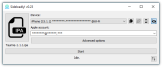 Yes, you can! Which macOS version are you using?
-
-
 This hack is now updated to App Store version 5.6.0!
-
-
Correct! It was released roughly 12 days ago.
-
I was doing some testing on Archero, and I have to say that I ended up playing for longer than I should have.
-
Please try the suggestions mentioned here:
-
-
Happy Lunar New Year 2021 from the iOSGods Team! We wish you the very best! May luck, love & harmony follow you throughout 2021! To celebrate, iOSGods will be offering a 35% discount will be applied to your ViP purchase when using coupon code IGLUNARNEWYEAR21 during checkout. This coupon is available for all packages below & for all members. Expires on the 14th of February. - Non-Jailbroken & Jailbroken ViP + 3 Months - Jailbreak ViP - 2 Months - Jailbreak ViP - 3 Months Happy Lunar New Year everyone! Please note that you are only allowed to use this coupon code only one time on one subscription. If you already have an active ViP, you need to contact me to extend your subscription after your purchase. Perks of being a ViP Member on iOSGods topic here: https://iosgods.com/topic/92593-perks-of-being-a-vip-member-on-iosgodscom/
-
Please try to enable untrusted installs from your macOS settings.
-
-
-
-
-
This hack is now updated to App Store version 2.0.02!
-
 This hack is now updated to App Store version 3.3.44!
-
This hack is now updated to App Store version 2.16.3!
-
-
-
Will do! But don’t update unless it’s forced.
-
Have you tried A-Bypass or KernBypass or something else?
-
I checked, and seems like your message landed in the spam folders. They should get on it!
-
Please read our "iOSGods App+ Frequently Asked Questions & Answers" topic here: https://iosgods.com/topic/100620-iosgods-app-frequently-asked-questions-answers/
-
-
This hack is now updated to App Store version 5.0.41!







